How Do I Cancel my Premium Account?
Author: Dylan Buckley
February 12, 2026
1 min read
Start your credit building journey for your business
Deactivating your Basic/Free FairFigure account and canceling your Premium Plan are two separate activities. However, the start of the process looks similar.
Log in to your FairFigure account. On the left side of the screen, locate the menu with the list of available FairFigure features and tools. Use the scroll wheel to scroll to the bottom. Then, click the “Settings” menu.
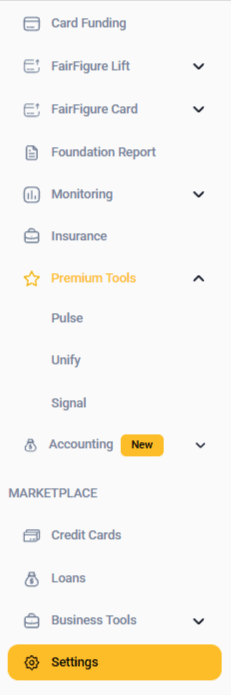
After you’ve clicked Settings, three new tab options will pop up: Personal Information, Login & Security, and Billing & Plans.
Click on the Billing & Plans tab, and you’ll see your current plan listed at the top. Underneath that, you’ll see a button that will allow you to “Cancel My Plan”. Click on that button, as shown below.
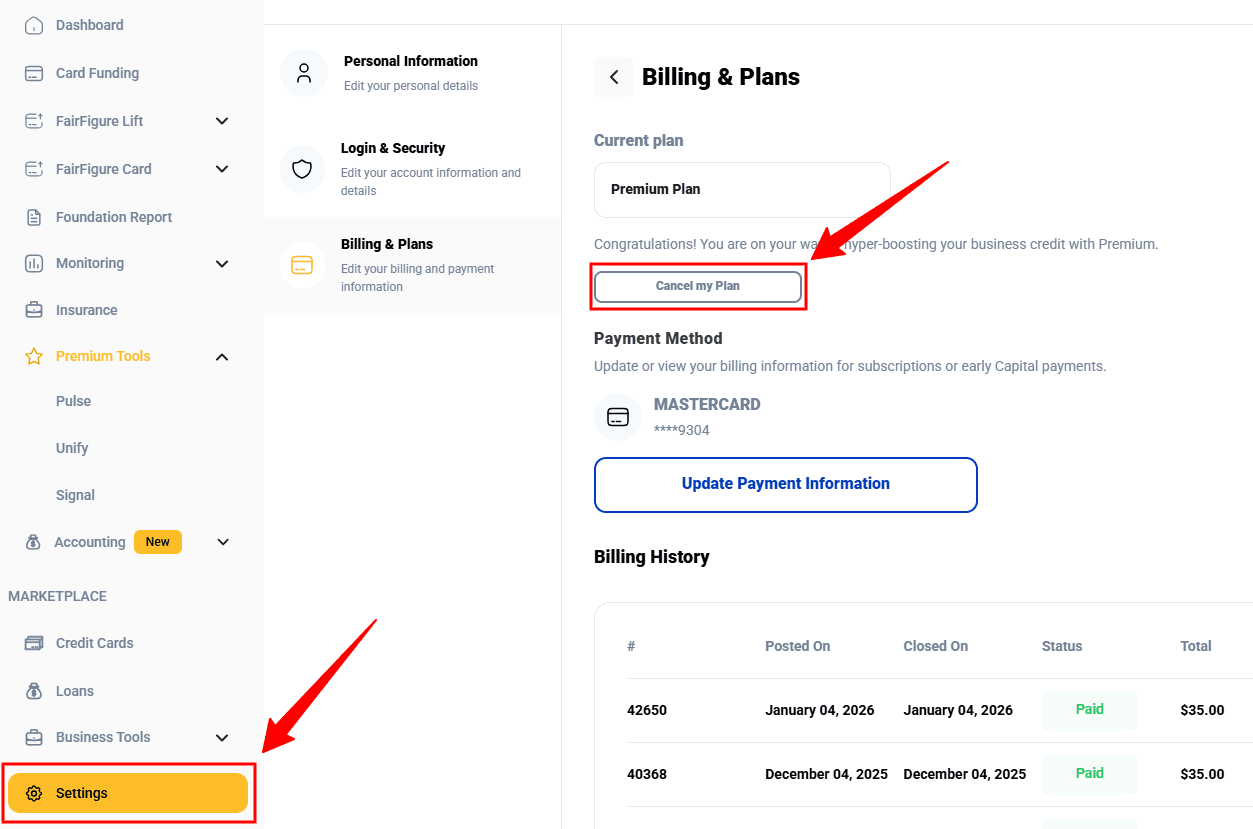
Please note that selecting the “Cancel My Plan” will cancel your payments, which are being reported to commercial credit bureaus monthly, and help you build your credit.
More articles
Read More >
October 08, 2026
15 min read
October 08, 2026
12 min read

October 08, 2026
13 min read
Start your credit building journey for your business
Start your credit journey now with FairFigure